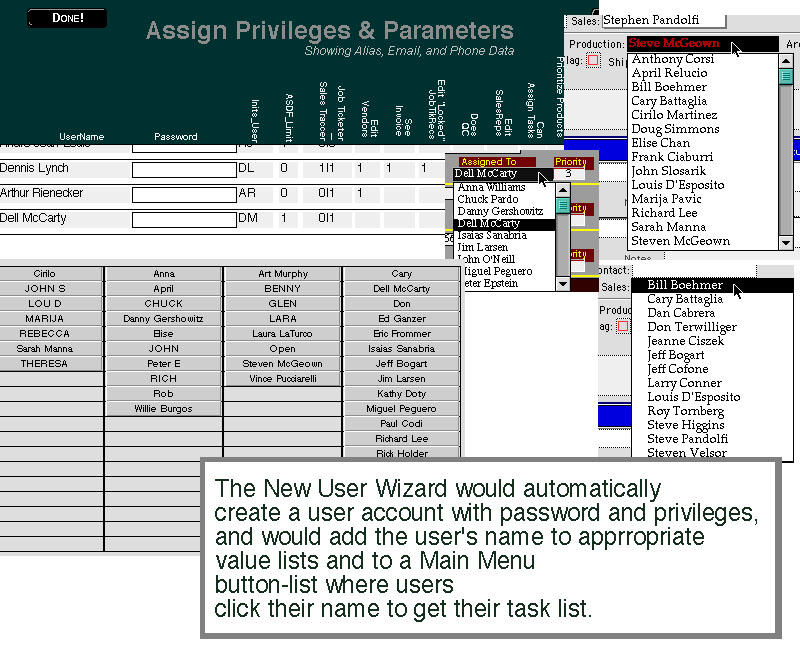
Like many other equivalently complex systems, the DCC Solutions, in addition to requiring the addition of a username + password + associated privileges record in order for a new hire to be added to the system, needed to have that user's name appear in various dropdown lists -- as a person who could potentially be assigned to a task, as a person who has his or her own listview of assigned tasks to bring up and attend to, as a person to whom relevant email might be addressed to at the click of a button, and so forth.
One thing that neither I nor the various departmental managers were happy with was them having to email me to add someone to the system, then me having to call them or email them back to ask various questions about the user in order to set them up properly, and then me rooting around through various files and editing various value lists, clicking permissions boxes to set permissions parameters, and so on. Annoyingly time-consuming and inefficient for such a recurrent task.
So fairly early on I changed all value lists from custom value lists to value lists that would all reference the same Main Menu file, while changing the array of "get your task list" buttons and associated scripts to an array of four selfjoin relationships with one button and one script each. The appearance of a new person's name in any of a dozen-plus value lists, as well as their name's presence on a button on the Main Menu, are all determined by parameters entered on one record, in one field. Also stored in this one record are user's email addresses and the name of their department.
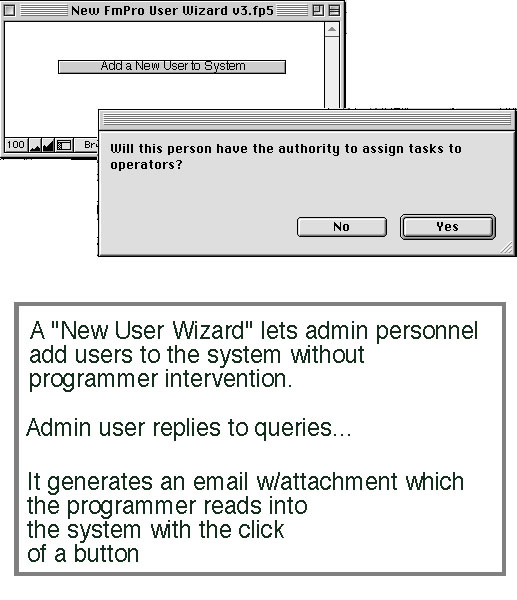
Having done that, I scripted the adding of a new record to the Main Menu file and to the Logon file, so that I could add a new user with the click of a button from my own console; and then, finally, created a modified version of that scripted routine that would generate an exported file that I could import into my console, put that modified version in a standalone FileMaker local file, and distributed it to administrative personnel. Now when they want to add a user to the system, they run their New User Wizard, email me the resultant exported file as a file attachment, and I import its data fields into global fields in my developer's managerial console and run the script that puts the data into the Logon and Main Menu files. In this fashion, I retain sole editing access to the files that determine who has privileges within the system, while letting the administrators run a routine that asks them the questions I need answered about a new user, and the actual adding of the new users is rendered nearly effortless for me. (The New User Wizard runs a check routine to make sure the username is not already in use in the target file systems)