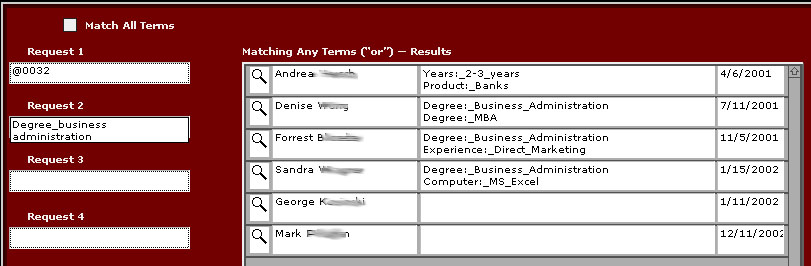
The QuickFind screen. In this example, the first, fifth and sixth hits are in response to the entering of a job code ("@0032) for an administrative assoc VP position. (The assoc VP position was on screen at the time the user went to the QuickFind screen by clicking the magnifying glass icon on the main screen, but it can be entered here manually from a drop-down list; or no job codes need be used at all). The remaining three hits are in response to the additional parameter, "degree_business_administration" which was entered under "Additional job qualifications" for these other applicants.
This screen enables HR personnel to quickly identify qualified active applicants relevant to a job they've just entered in the system.
Up to four requests can be entered on this screen. Clicking the checkbox allows user to perform an "and" and obtain a list of applicants who meet all the criteria rather than the "or" find(where any applicant meeting any of the criteria) shown here.