 FileMaker Pro Administrative
User_Name Access and Security System
FileMaker Pro Administrative
User_Name Access and Security System FileMaker Pro Administrative
User_Name Access and Security System
The native built-in FileMaker security as of FileMaker 6 was an ancient thing, dating back at least as far as FileMaker Pro version 1.0, and to rely on it by itself to control privileges and access for a set of users who are constantly being shifted from group to group and responsibility to responsibility (as well as joining and leaving the company altogether) would be awkward at best: the access privileges screens are only available when the solution is NOT running on FileMaker Server, so everyone must be kicked out, the solution unserved from server, and opened as a set of local files on the developer's workstation. Furthermore, the security needs to be set on a file by file basis, with no central administrative perspective from which to see what you've done so far. When you add to that the possibility that in a large company environment some files within one solution will become components of another as well, the bookkeeping efforts that would be necessary in order to create and delete and modify an ever-changing set of passwords and define privileges becomes prohibitively complicated.
(If you want to read about this in more detail, here is a link to a copy of a longer statement I wrote on the subject).
To address this situation at BBDO, where we ran and supported over 60 solutions for nearly 300 users, I created a system to work in conjunction with the built-in FileMaker security, one in which all privilege differences other than those distinguishing programmers from end users were assigned through a logon process written into a database file.
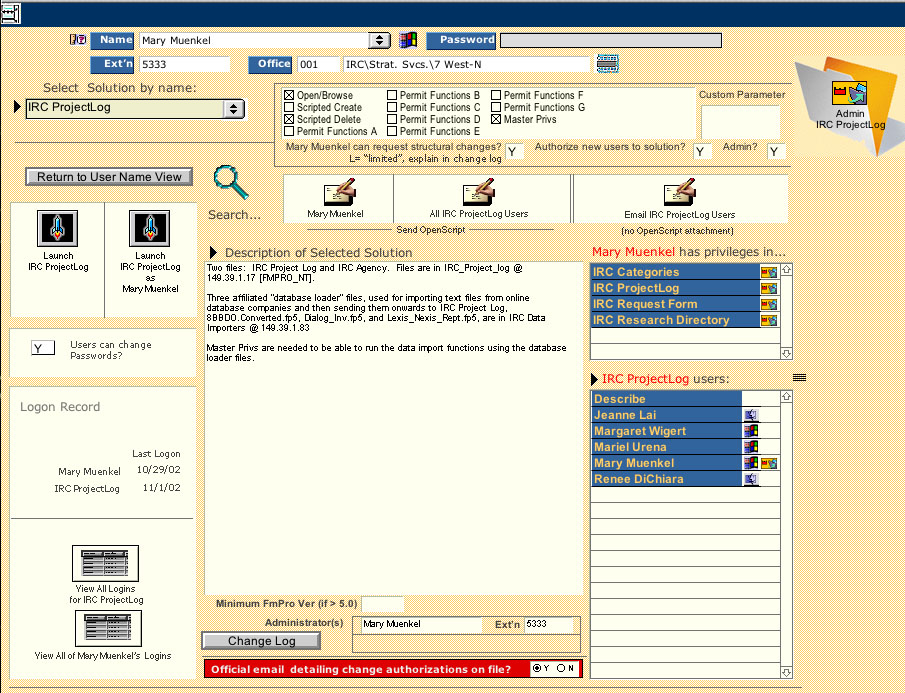
Here is the main administrative console (screen shot), and here is the same screen cluttered up with explanations and whatnot. This is the screen from which users would be assigned privileges within a certain solution and then sent the file that opens the solution and starts the logon process.